CPU为了更快速度读取数据,都会用到Cache,因为直接访问RAM速度会比较慢。现代的CPU架构都会支持多级Cache,有单核独享的cache,也有多核共享的cache。
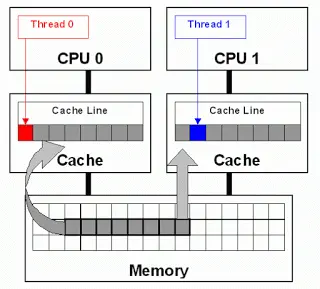
Cache Ping-Pong
当多个core要并行操作内存中的同一份数据,就会出现Cache ping-pong的问题. 举一个多线程修改变量的例子:
#include <iostream>
#include <thread>
#include <atomic>

std::atomic<std::uint64_t> counter;
std::uint64_t max_iter = 10000000000;

void single_thread()
{
    counter = 0;
    for(std::uint64_t pos = 0; pos < max_iter; pos ++){
        counter ++;
    }
    std::cout << "counter:" << counter << std::endl;
}

void multi_thread()
{
    counter = 0;
    max_iter /= 2;
    std::thread t0 = std::thread([&](){
        for(std::uint64_t pos = 0; pos < max_iter; pos ++){
            counter ++;
        }
    });
    std::thread t1 = std::thread([&](){
        for(std::uint64_t pos = 0; pos < max_iter; pos ++){
            counter ++;
        }
    });
    if(t0.joinable()){t0.join();}
    if(t1.joinable()){t1.join();}
    std::cout << "counter:" << counter << std::endl;
}

int main(int argc, const char **argv)
{
    //single_thread();
    multi_thread();
    return 0;
}
编译运行:
g++ -o3 -pthread example.cpp -o example && time ./example
运行结果: 单线程版本:63.19s user 0.00s system 99% cpu 1:03.19 total 多线程版本:276.84s user 0.01s system 197% cpu 2:19.87 total
可以看到单线程版本和多线程版本cpu都运行满的情况下,单线程版本居然比多线程更快。
使用perf统计性能:sudo apt-get install -y linux-tools-$(uname -r) linux-tools-generic && sudo perf stat ./example 结果为:
Performance counter stats for './example':

         63,188.09 msec task-clock                #    1.000 CPUs utilized
                41      context-switches          #    0.649 /sec
                 3      cpu-migrations            #    0.047 /sec
               129      page-faults               #    2.042 /sec
   270,748,024,665      cycles                    #    4.285 GHz
   240,110,277,766      instructions              #    0.89  insn per cycle
    40,019,880,972      branches                  #  633.345 M/sec
           275,858      branch-misses             #    0.00% of all branches

      63.189142058 seconds time elapsed

      63.188912000 seconds user
       0.000000000 seconds sys

Performance counter stats for './example':

        316,290.36 msec task-clock                #    1.998 CPUs utilized
               570      context-switches          #    1.802 /sec
                76      cpu-migrations            #    0.240 /sec
               140      page-faults               #    0.443 /sec
 1,353,827,714,501      cycles                    #    4.280 GHz
   240,501,155,187      instructions              #    0.18  insn per cycle
    40,091,473,600      branches                  #  126.755 M/sec
         1,145,854      branch-misses             #    0.00% of all branches

     158.316800457 seconds time elapsed

     316.291403000 seconds user
       0.000000000 seconds sys
可以看到insn per cycle(表示每时钟周期运行多少个指令)单线程为0.89,比多线程0.18大得多。
分析:
为了保证cache的一致性,如果两个核心的cache中都是用了同一个变量,那么该变量会分别出现在C1 cache和C2 cache中, 而在多核计算机上,操作系统显然有极大概率将两个线程分配给了两个CPU核心,这里假设为C1和C2。
两个线程都需要对该变量执行加1操作,假设此时线程1开始对变量执行加法操作,为保证cache一致性必须将C2 cache中的变量置为无效:乒。
此后,C2将不得不从内存中读取变量的值,然而C2也需要将全局变量加1,为保证cache一致性必须将C1 cache中的变量置为无效:乓。
至此两个线程频繁的维持cache一致性导致缓存不但没有起到应有的作用反而拖累了程序性能。在这种情况下,维护cache的开销以及从内存中读取数据的开销占据了主导地位,这样的多线程程序其性能反而不如单线程程序。
False Sharing(伪共享)
缓存系统中是以缓存行(cache line)为单位存储的。缓存行是2的整数幂个连续字节,一般为32-256个字节。最常见的缓存行大小是64个字节。当多线程修改互相独立的变量时,如果这些变量共享同一个缓存行,就会无意中影响彼此的性能,这就是伪共享。缓存行上的写竞争是运行在SMP系统中并行线程实现可伸缩性最重要的限制因素。有人将伪共享描述成无声的性能杀手,因为从代码中很难看清楚是否会出现伪共享。
#include <iostream>
#include <thread>
#include <atomic>

struct CounterType{
    std::uint64_t a;
    //int arr[16];
    std::uint64_t b;
} counter;

std::uint64_t max_iter = 10000000000;

void single_thread()
{
    counter.a = 0;
    counter.b = 0;
    for(std::uint64_t pos = 0; pos < max_iter; pos ++){
        counter.a ++;
    }
    for(std::uint64_t pos = 0; pos < max_iter; pos ++){
        counter.b ++;
    }
    std::cout << "counter:" << counter.a << " " << counter.b << std::endl;
}

void multi_thread()
{
    counter.a = 0;
    counter.b = 0;
    std::thread t0 = std::thread([&](){
        for(std::uint64_t pos = 0; pos < max_iter; pos ++){
            counter.a ++;
        }
    });
    std::thread t1 = std::thread([&](){
        for(std::uint64_t pos = 0; pos < max_iter; pos ++){
            counter.b ++;
        }
    });
    if(t0.joinable()){t0.join();}
    if(t1.joinable()){t1.join();}
    std::cout << "counter:" << counter.a << " " << counter.b << std::endl;
}

int main(int argc, const char **argv)
{
    single_thread();
    //multi_thread();
    return 0;
}
编译运行:
g++ -o3 -pthread example.cpp -o example && time ./example
运行结果: 单线程版本:36.19s user 0.00s system 99% cpu 36.200 total 多线程版本:64.40s user 0.00s system 195% cpu 32.883 total
可以看到多线程操作并没有共享变量,此时单线程版本依然比多线程版本更快。
分析:
尽管这两个线程没有共享任何变量,但这两个变量极有可能位于同一个cache line上,也就是说这两个变量可能会共享同一个cache line。cache和内存之间是按照cache line为单位来交互的,当访问变量a未能命中cache时,会把a所在的cache line一并加载到缓存中,而变量b极有可能也会被加载进来。
也就是说,尽管看上去这两个线程没有共享任何数据,但cache的工作方式导致其可能会共享cache line,这就是有趣的False Sharing问题,直译过来就是伪共享,这同样会导致cache ping-ponging问题。
通过查看cache line 大小:cat cat /sys/devices/system/cpu/cpu0/cache/index0/coherency_line_size 结果为:64字节。
在变量a与b之间填充超过64字节大小的数据即可避免False Sharing问题。